Independent app · Sand.ai’s MAGI-2 model, announced November 24, 2026
MAGI-2 AI Video Generator
Type a prompt or upload a picture and get a 1080p video of up to 30 seconds, with dialogue, sound effects and music made together with the image. No install and no GPU needed — use it from any browser.
- Text & image to video
- Sound & lip-sync
- 1080p · 25 fps
- 4–30 second videos
Aspect ratio
Length
Sound
New accounts get 20 welcome credits. The shortest video (4 seconds) costs 52, so your first video needs a plan or credit pack.
Your MAGI-2 video
The finished video will play here.
Sample videos
Cinematic scenes, fight sequences and anime-style animation, from 6 to 30 seconds long. They show how the model handles faces, fast motion, smoke and light effects, and quick cuts.
Preparing fish at the market
Cinematic · 15sDuel in a red sandstorm
Cinematic · 30sFairy warriors in colored smoke
Action · 12sFight in a glowing hall
Action · 20sGiant robots on a salt flat
Action · 30sWinged cat in space
Animation · 24sHero with a golden sunburst
Animation · 6sLaunch sample clips made with MAGI-2; they were not made on this site. Previews play without sound, so they don’t show the audio.
MAGI-2 reference to video: one character, three places
One reference sheet set the character, her outfit and three flower landscapes: an iris hillside, a pink rose garden and a lily valley. MAGI-2 kept her look the same in every shot and moved between the places with close-ups, low-angle views and wide shots, with sound generated alongside the picture.
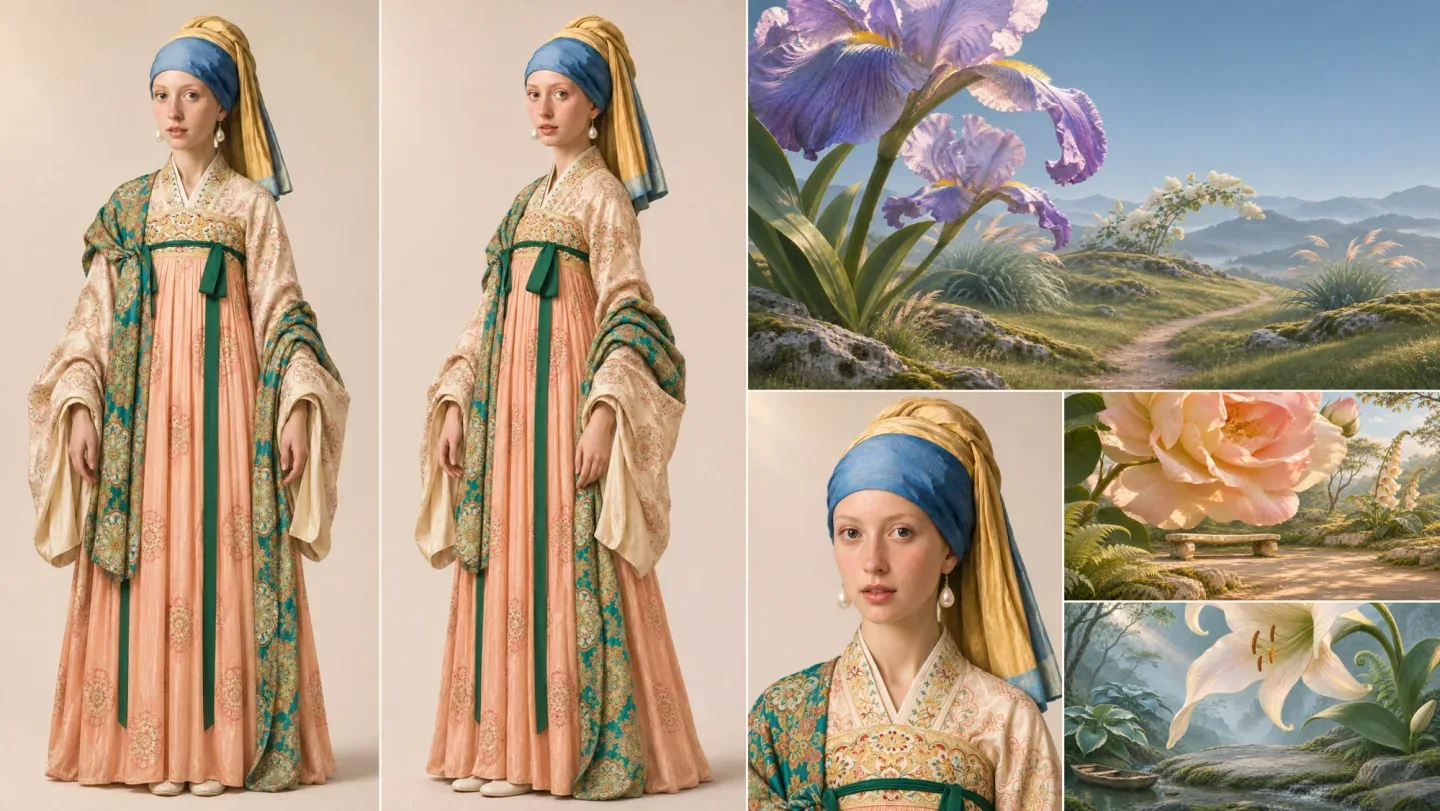
Official MAGI-2 sample published by Sand.ai; it was not made on this site. Turn on the sound in the player to hear it.
What is MAGI-2?
MAGI-2 is a video generation model from Sand.ai, the AI video company behind MAGI-1 and the open MAGI-2 Preview. It was announced on November 24, 2026. It is a mixture-of-experts model with about 480B parameters in total, of which about 28B are active for each token, and Sand.ai says it was trained on about 4T tokens, roughly three times the data used for the Preview.
A single generation can run for up to 30 seconds at native 1080p and 25 frames per second, in any of six aspect ratios. Sound is not added afterwards: picture and audio come out of the model together, so it can produce spoken dialogue with matching lip movement, foley such as footsteps or rain, room ambience and music in one pass.
Sand.ai reports that MAGI-2 lifted its average Elo on the Artificial Analysis Video Arena v2.1, across image to video and text to video with and without sound, from 998.5 for the Preview to 1150.3. Sand.ai has said it will open-source MAGI-2 and publish a full technical report, but has not given a date. This site runs the hosted November 2026 model, not the open Preview.
Figures above come from Sand.ai’s MAGI-2 announcement (sand.ai/blog/magi-2). Independent benchmark results have not been published yet. Magi 2 AI is an independent site and is not affiliated with Sand.ai.
- longest video per generation
- 30 s
- native resolution at 25 fps
- 1080p
- total parameters, about 28B active
- 480B
- average Video Arena Elo, per Sand.ai
- 1150.3
MAGI-2 vs MAGI-2 Preview
The Preview came out in August 2026 as an open model. The full release is about four times larger, makes videos three times longer and, by Sand.ai’s numbers, scores higher. Here is how the two compare.
| Release and size | MAGI-2 | MAGI-2 Preview |
|---|---|---|
| Release and size | November 24, 2026 · about 480B total, 28B active | August 5, 2026 · about 114B total, 6B active |
| Weights | Open-source release promised, not out yet | Open, Apache 2.0 |
| Video Arena v2.1 average Elo (Sand.ai’s figures) | 1150.3 | 998.5 |
| Video length and resolution | Up to 30 s · 1080p, 25 fps | 10-second clips |
| Sound made with the picture | Yes: dialogue with lip-sync, foley, ambience, music | Yes |
What you can make here
You use it from your browser, with no GPU and nothing to install. The price of each video is shown before you generate, and failed generations are refunded automatically.
Text to video
Describe a scene in plain words — the subject, what happens, the place, the light, the camera and the sound — in a prompt of up to 4,000 characters. There is room to describe several moments in order.
Image to video with start and end images
Upload a photo, illustration or product shot as the first frame (JPG, PNG or WebP, up to 20 MB) and the model brings it to life. Add an optional end image to guide where the shot ends. The prompt is optional in this mode.
Sound made with the picture
Dialogue with lip-sync, footsteps and other foley, background ambience and music are generated together with the video. Turn sound off if you only need the picture — the price stays the same.
Six aspect ratios
Choose 16:9 for YouTube and screens, 9:16 for Reels, Shorts and TikTok, 1:1 or 4:3 and 3:4 for feeds, or 21:9 for a wide cinematic frame. All six work in every mode.
4 to 30 seconds
Pick 4, 5, 8, 10, 15, 20 or 30 seconds. Short lengths are good for testing an idea; 20 and 30 seconds leave room for a small scene with more than one beat.
1080p at 25 fps
Every video comes out at 1080p and 25 frames per second as an MP4. It is saved to your history on this site, and you can download it whenever you like.
How to use the MAGI-2 AI video generator
- 01
Write a prompt or add an image
Stay on Text to video and describe your scene, or switch to Image to video and upload a start image (plus an end image if you want one). Sign in with Google first.
- 02
Choose length, shape and sound
Pick a length from 4 to 30 seconds, an aspect ratio and whether you want sound. The cost updates as you go: 13 credits per second, so a 5-second video is 65 credits.
- 03
Generate and download
Press Generate video. Your request joins the queue and the video plays here when it is ready. Download the MP4, or change a line in the prompt and try again.
Pricing
Every second of video costs 13 credits in every mode, with sound on or off: 52 credits for 4 seconds, 65 for 5, 130 for 10 and 390 for 30. Failed generations are refunded automatically.
Basic
For trying ideas and the occasional short video.
- 800 credits every month
- About 12 five-second 1080p videos
- Text to video, image to video and reference to video
- 1080p, 4 to 30 seconds
- Sound included, or switch it off
Pro
For creators who make videos every week.
- 1,800 credits every month
- About 27 five-second 1080p videos
- Text to video, image to video and reference to video
- 1080p, 4 to 30 seconds
- Sound included, or switch it off
Max
For heavy users who make a lot of video.
- 4,000 credits every month
- About 61 five-second 1080p videos
- Text to video, image to video and reference to video
- 1080p, 4 to 30 seconds
- Sound included, or switch it off
FAQ
Frequently asked questions
Answers about the model, prices and what this site can do. Can’t find yours? Email support@magi2ai.net.
What is MAGI-2?
MAGI-2 is Sand.ai’s video generation model, announced on November 24, 2026. It turns a text prompt or an image into a video of up to 30 seconds at 1080p and 25 fps, and it generates the sound at the same time as the picture. It follows the MAGI-2 Preview from August 2026 and is much larger: about 480B parameters in total, with about 28B active per token.
Is this the official Sand.ai website or app?
No. Magi 2 AI is an independent web app. It is not affiliated with, endorsed by or operated by Sand.ai. We run Sand.ai’s hosted MAGI-2 model through a licensed API so you can use it from your browser with a Google account. Sand.ai’s own website is sand.ai.
How much does a MAGI-2 video cost? Is it free?
Videos cost 13 credits per second, whatever the mode and whether sound is on or off: 4 seconds is 52 credits, 5 seconds 65, 10 seconds 130, 15 seconds 195 and 30 seconds 390. New accounts get 20 welcome credits, valid for 365 days; that is not enough for a video on its own, so you will need a plan or a credit pack to generate. Monthly plans start at $29.90 for 800 credits.
How long can videos be, and in what resolution?
You can choose 4, 5, 8, 10, 15, 20 or 30 seconds. Every video is 1080p at 25 frames per second and downloads as an MP4. Aspect ratios are 16:9, 9:16, 1:1, 4:3, 3:4 and 21:9, in every mode: text to video, image to video and reference to video.
Does MAGI-2 make sound and dialogue?
Yes. Sound is generated together with the picture, so MAGI-2 can produce spoken dialogue with lip-sync, sound effects and foley, background ambience and music. Describe what you want to hear in your prompt. Sound is on by default; switch it off if you only want the picture. The price is the same either way.
How do I turn an image into a video?
Switch the generator to Image to video and upload a start image in JPG, PNG or WebP, up to 20 MB. You can also add an end image so the shot finishes where you want. A prompt is optional, but describing the motion, the camera and the sound gives you more control. Pick the aspect ratio that matches your image.
Is MAGI-2 open source? Is it on GitHub?
Not yet. Sand.ai has said it will open-source MAGI-2 and publish a full technical report, without giving a date. The earlier MAGI-2 Preview, released on August 5, 2026, is open under the Apache 2.0 license, with its code on GitHub (SandAI-org/MAGI-2-preview). It is a smaller model of about 114B parameters that makes 10-second clips. This site uses the hosted MAGI-2, not the Preview.
What happens if a generation fails?
If a video fails, times out or is blocked by the content filter, the credits go back to your balance automatically. If you bought a plan by mistake and used few or no credits, email support@magi2ai.net within 7 days and we will review a refund. Used credits are generally not refundable, and you can cancel a subscription at any time.
Can I use the videos commercially?
Please read our Terms of Service before using a video in a commercial project. You are responsible for your prompts, the images you upload and how you use the results — for example, making sure you have the rights to any people, brands or artwork that appear in them.
Make your first video with sound
Sign in with Google, describe a scene or upload an image, and get a 1080p video with sound of up to 30 seconds.